
Products >> RTMP Client
RTMP Client - Ultra-Low-Latency H.265 Player & SDK for Multi-Stream Playback
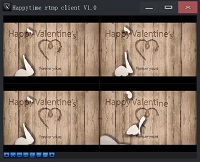

Happytime RTMP Client is designed specifically for streaming media playback and development. It is not only a powerful RTMP client program, but also a highly customizable SDK designed to simplify the processing of real-time streaming media and ensure high-quality audio and video transmission experience.
Happytime RTMP Client is a powerful and easy-to-use RTMP client program with comprehensive RTMP protocol support, extensive server compatibility, cross-platform support, rich codec support (H.265/H.264), flexible window layout management, hardware-accelerated decoding and video rendering, and local video recording capabilities.

Support playing multiple RTMP streams simultaneously
Support offline reconnection
RTMP client SDK for embedded
Low latency rtmp client with IPv6 support
RTMP client with recording and H265 support
Support multi-monitor video wall (up to 4 screens, 100 streams)





Key Features of RTMP Client
✅ Ultra-Low Latency: Sub-second playback for real-time monitoring.
✅ H.265 & H.264 Support: Full decoding of H.265/HEVC, H.264, AAC, G.711.
✅ Multi-Stream Playback: Play multiple RTMP streams simultaneously in custom layouts.
✅ Video Wall:
Multi-monitor video wall across several physical screens (up to 4 screens, 25 cells each) with bezel compensation and template saving/loading.
✅ Offline
Reconnection: Auto-reconnect when network drops – ideal for unstable environments.
✅ Local Recording: Record streams to AVI files with zero-copy – no quality loss.
✅ Hardware Acceleration: GPU decoding (DXVA, VAAPI) to reduce CPU usage.
✅
Cross-Platform: Runs on Windows, Linux, Android, iOS, Mac.
✅ C/C++ SDK: Embed into your own applications or embedded systems.
Technical specifications of RTMP Client
Programming language: C/C++
RTMP protocol support: Comprehensive support for RTMP, RTMPE, RTMPS, RTMPT, RTMPTS, RTMPTE, and RTMPFP protocols.
SDK interface: Provides SDK interface for developers to integrate into their own applications.
High compatibility:
Happytime RTMP client has undergone rigorous testing to ensure compatibility with most RTMP servers.
Stability: It has high stability and is suitable for long-running streaming media playback scenarios.
Local recording: Support local video recording, and can set the recording
duration or file size to achieve automatic switching of file recording.
Use Cases & Applications
Video Surveillance: Monitor multiple RTMP camera streams from NVR.
Live Streaming: Watch low-latency live events from OBS or CDN.
Embedded Systems: Integrate SDK into DVR, kiosk, or IoT devices.
Custom Development: Build your own RTMP player with C/C++
SDK.
Remote Monitoring: View streams with offline reconnection for unstable networks.
Command Center Video Wall: Display many RTMP streams across multiple monitors with bezel compensation.
Flexible Layout & Recording
Supports any window layout (1x1, 2x2, 4x4, etc.)
Automatically save layout, restore upon startup
Video recording supports automatic segmentation by time/size
Support multi-monitor video wall
The Video Wall feature extends video viewing across several physical monitors for control-room or multi-display setups. Every enabled monitor shows its own borderless, full-screen grid of video windows, as the following:

Click the Video Wall toolbar button and configure each screen in the Video Wall Setting dialog: enable the screen, set the grid rows/columns (up to 5x5, 25 windows per screen), and set bezel compensation so pictures are not hidden behind thick monitor
bezels. Wall layouts can be saved and loaded as templates (XML).
Currently playing windows are moved onto the wall without being stopped. Up to 4 monitors are supported. Exit with Esc, the Exit Wall button, or the context menu Exit Video Wall; streams return to the main window automatically.
Related Resources
Frequently Asked Questions (FAQ)
What is an RTMP client?
An RTMP client plays live video/audio streams from an RTMP server. Happytime RTMP Client supports H.265, multi-stream, offline reconnection, and local recording.
Does it support H.265/HEVC?
Yes. Full support for H.265 and H.264 video codecs.
Can I play multiple RTMP streams at once?
Yes. Supports simultaneous playback of multiple RTMP streams in customizable layouts.
Does it support offline reconnection?
Yes. Automatically reconnects when the network is restored.
Can I record while playing?
Yes. Built-in AVI recording with zero-copy – no quality loss.
Is there an SDK?
Yes. C/C++ SDK available for embedding into custom or embedded applications.
What platforms does it run on?
Windows, Linux, Android, iOS, and Mac. Supports embedded systems.
Does it support a multi-monitor video wall?
Yes. The video wall spreads streams across up to 4 physical monitors, each with its own borderless full-screen grid (up to 5x5), bezel compensation, and template saving/loading. Currently playing streams move onto the wall automatically without interruption.